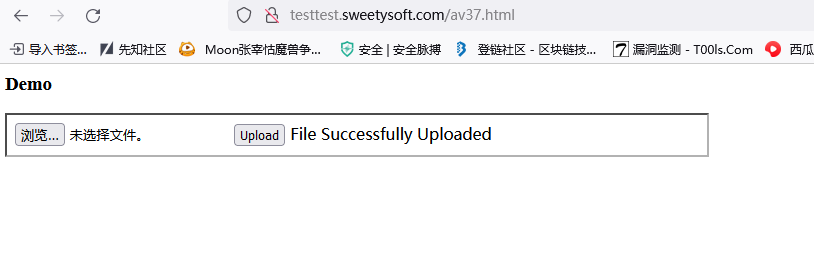
refer to:
https://stackoverflow.com/questions/3167240/asp-net-file-upload
1. 需要一个html入口:asp_net_upload_demo.html
<h3>ASPX file upload demo</h3>

<iframe height="40" width="700" src="Uploadfile.aspx">
</iframe>
2.Uploadfile.aspx的内容为:
<!--
Usage: visit `asp_net_upload_demo.html`
-->
<%@ Page Language="C#" AutoEventWireup="true" CodeFile="Uploadfile.aspx.cs" Inherits="Uploadfile" %>
<!DOCTYPE html PUBLIC "-//W3C//DTD XHTML 1.0 Transitional//EN" "http://www.w3.org/TR/xhtml1/DTD/xhtml1-transitional.dtd">
<html xmlns="http://www.w3.org/1999/xhtml">
<head runat="server">
    <title>File Upload Control</title>
</head>
<body>
    <form id="form1" runat="server">
    <div>
    <asp:FileUpload  runat="server" ID="fuSample" />
    <asp:Button  runat="server" ID="btnUpload" Text="Upload"
            onclick="btnUpload_Click" />
            <asp:Label runat="server" ID="lblMessage" Text=""></asp:Label>
    </div>
    </form>
</body>
</html>
3. Uploadfile.aspx.cs
/*
 * Usage:
 * please change the Server.MapPath parameter as your file upload folder
 * default is: "./data"
 * visit `asp_net_upload_demo.html`
 *
 * */
using System;
using System.Collections.Generic;
using System.Linq;
using System.Web;
using System.Web.UI;
using System.Web.UI.WebControls;
public partial class Uploadfile : System.Web.UI.Page
{
  protected void Page_Load(object sender, EventArgs e)
  {
  }
  protected void btnUpload_Click(object sender, EventArgs e)
  {
    //Files is folder Name
    fuSample.SaveAs(Server.MapPath("/data") + "//" + fuSample.FileName);
    lblMessage.Text = "File Successfully Uploaded";
  }
}
把这三个文件放到iis的文件夹下面,就可以了: